
Save Notebooks to GitHub
When working in Notebook Lab, your notebooks are saved back to your linked GitHub repository via pull requests (PRs). This keeps your example notebooks version-controlled and makes them available to users when they click Explore the Data.
How It Works
Notebook Lab does not push directly to your repository's main branch. Instead, it opens a pull request so you can review changes before they go live.
Submitting a Pull Request
After you have finished editing your notebooks and the README.md file:
- CTRL-click to select all the files you have changed
- Click the Pull Request button to submit your changes
- Add a brief description of your changes
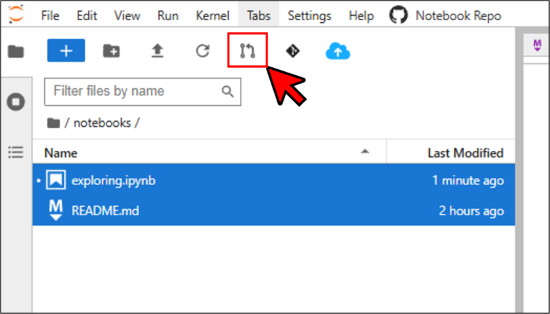
Once the PR is merged on GitHub, your notebooks are live for users.
GitHub Authorization
The first time you use the pull request feature, you will be prompted to authorize MSD-LIVE to access your GitHub account. This is a one-time setup that allows MSD-LIVE to open pull requests on your behalf. You retain full control — review and merge pull requests directly on GitHub.