
Contributing Back
If you create a community or dataset notebook, you can share it with others by submitting a GitHub pull request (PR). All PRs are reviewed and must be approved before they become available. Reviewers are assigned based on the folder where your notebook is located:
-
community_notebooks — PRs are sent to MSD-LIVE administrators for review and approval.
-
notebooks — PRs are sent to the dataset owner for review and approval.
Submit a Pull Request
After you have completed your edits, use the following steps to submit a GitHub pull request (PR):
-
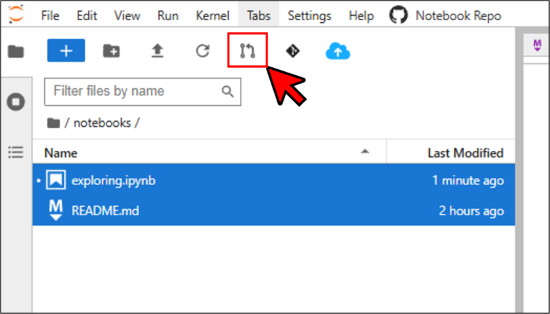
CTRL-click to select all the files you have changed.
-
Click the pull request (PR) button to submit your changes.
- Add a brief description of your changes.
Best Practices
- Keep notebooks focused — Create one notebook per analysis or workflow
- Write clear explanations — Use markdown cells and comments to explain each section
- Include practical examples — Show users how to subset, filter, and transform data
- Test thoroughly — Run notebooks against real data before publishing
- Document dependencies — List required packages and any external data
- Use descriptive filenames — Make notebook purpose clear at a glance